
How can we help?

This guide is for reading more than one mailbox in Loop, for example your own and a shared one such as info@example.com: how to add the second one to Mail, move between them and keep them in order. A mailbox is the mail on the mail server; an account is its connection in Mail.
Before you start
- One account is already connected in Mail. If not, follow the guide Connect Your PearlFibers Mailbox first.
- You have the address of the mailbox to add and its own password: the one a mail program uses, not your Loop password. It must be a PearlFibers mailbox, an address of your company's email plan.
- On a phone, or in a narrow browser window, read "On a phone" below first.
Step 1 — Add the second mailbox
- On the Loop home screen, click the Mail tile. Your inbox opens.
- Click Manage Accounts, the last button in the card beside the message list. The Accounts page opens.
- Click Add Account. The form PearlFibers Professional Mail opens.
- Fill in Email Address and Password. In Display Name (optional) type the sender's name for mail written from this account, for example
Example Trading — Info. Check all three: none can be edited later. - Click Sign In. A green box reads Account connected successfully.
The inbox under it is not the new account's: Mail opens your primary account, the first one you connected until you choose another (Step 4).
Step 2 — Switch between your accounts
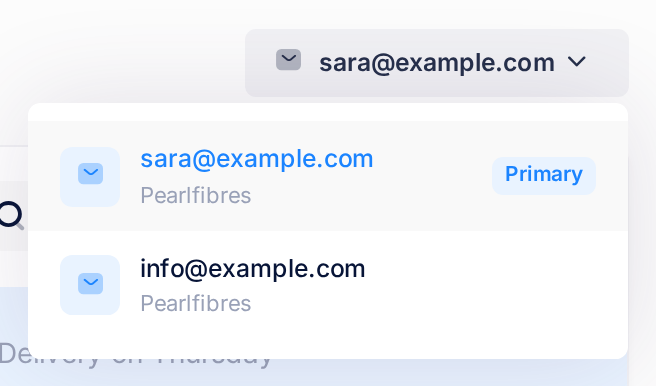
- Look at the top of the inbox: a button there now shows the address of the account you are reading.
- Click it. A list of your accounts opens, each with its address and the word Pearlfibres, and Primary on one of them.
- Click the other address. Its Inbox opens, and the button shows that address.
A new account's inbox reads No Messages at first. Mail copies a mailbox's mail into Loop in a sync, which runs by itself every five minutes: reload the page after that, or click Sync Now in the card beside the list. A sync brings at most 50 messages per folder, the oldest first, so the newest mail of a full mailbox shows last.
Accounts are never mixed: each has its own folders, Inbox and Sync Now. A message you write is sent from the account whose inbox is open: read the address on the button before you click New Message.
Step 3 — Read the Accounts page
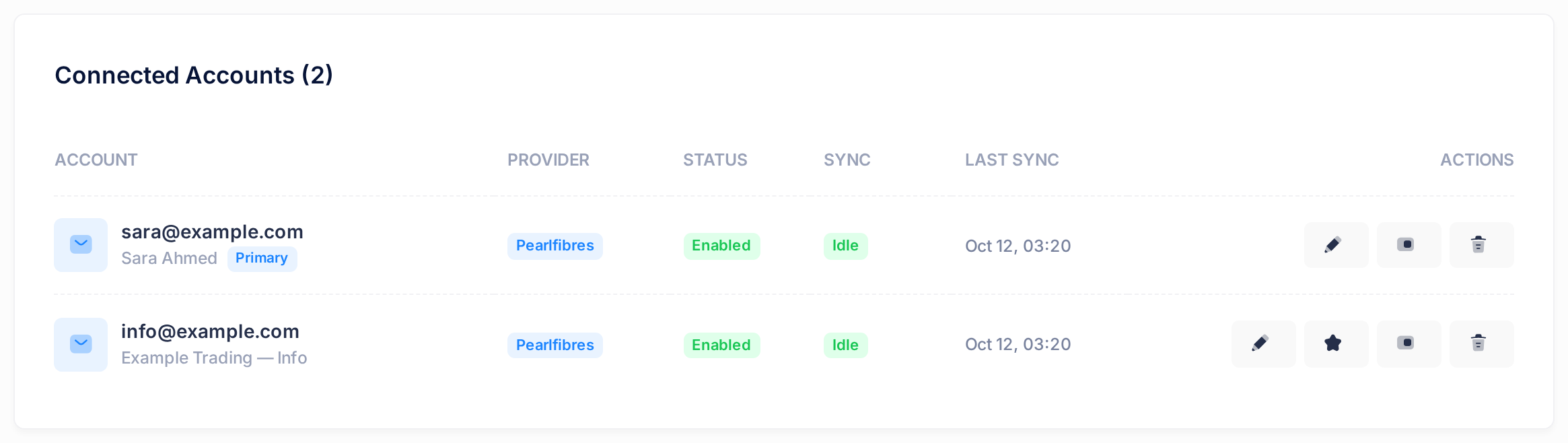
- Click Manage Accounts again. The card Connected Accounts (2) lists the primary account first.
| Column | What it tells you |
|---|---|
| ACCOUNT | The address, the display name under it, and Primary on the primary account. |
| PROVIDER | Pearlfibres for a PearlFibers mailbox. |
| STATUS | Enabled (green): the account is on. Disabled (red): it is off. |
| SYNC | Idle (green): at rest; the last sync, if there was one, worked. Syncing... (blue): one is running. Error (red): the last one failed. |
| LAST SYNC | When a sync last worked, on Loop's clock, not your local time. Never: none has worked yet. |
The last column, ACTIONS, holds picture buttons whose names show only while a pointer rests on them, so never on a phone. In order:
- a pencil, Signatures;
- a star, Set as primary (the primary account's row has none);
- a switch, Disable or, on an account that is off, Enable;
- a bin, Remove Account.
Step 4 — Choose the primary account
- On the Accounts page, click the star in the row of the account that should open first. Nothing asks you to confirm: a green box reads Primary account updated, and the row now stands first, with the badge Primary.
Primary decides which account opens when you open Mail. It changes nothing about sending or syncing.
Step 5 — Turn an account off and on
- On the Accounts page, click the switch in the account's row. Again nothing asks: a green box reads Account disabled, and STATUS shows Disabled.
- To turn it on again, click the same switch. The box reads Account enabled, and the next sync brings the mail that arrived meanwhile.
Off stops the account's syncing. The account stays in this list and under the account button, and its inbox still opens with the mail already copied, under a yellow line: This account is disabled. New mail will not appear here until you enable it again. There, Sync Now only answers with a browser message such as Sync failed: Account #25 is disabled (the number is Loop's own for the account).
A primary account that is off keeps its badge, but Mail opens the oldest account that is on. With every account off, Mail opens the form of Step 1 instead of an inbox: to come back, rest the pointer on the dark bar beside the page (on a phone, tap the grid icon) and click Accounts.
Step 6 — Remove an account
- On the Accounts page, click the bin in the account's row. A window Remove Account names the address and says This disconnects the account from Loop. The mailbox itself, its mail and its password are not touched.
- Check the address, and that you know the mailbox's password: you need it to connect this account again. Click Remove, or Cancel to keep the account. A green box reads Account removed, and the row is gone.
If it was the primary account, the oldest of the others becomes primary by itself.
There is no undo button, but Loop's copy of the mail is put out of sight, not erased: connect the same address again with Add Account and the account is back at once with its folders and its mail, and with the password and display name you type this time (the only way to change those). If it was primary, click its star again.
What happens next
Mail shows your own copy in Loop of each mailbox. What you do to a message there (marking it with the buttons, starring, moving, deleting) and the copies of mail you send or draft in Loop stay in that copy: Outlook, a phone's mail app and a colleague's Loop do not show them, and Loop does not show what is done there to a message it has already copied. One exception matters in a shared mailbox: opening a message in Loop marks it as read in the mailbox itself, for your colleagues too. Nothing done in Mail deletes anything from the mailbox. The guide Understand How Mail Syncs has the details.
On a phone
- The Accounts page. Tap the small button beside the folder's name, above the message list: the panel Folders opens, with Manage Accounts as its last button.
- The table is wider than its card. Drag the table sideways to reach the columns after PROVIDER and the buttons.
- Sync Now is in the same panel, above Manage Accounts.
If something goes wrong
- A red box on the form reads Authentication failed: Connection failed: IMAP authentication failed: NO [AUTHENTICATIONFAILED] Authentication failed. The mail server refused the address or the password, and nothing was saved. Type the mailbox's own password again.
- The SYNC column reads Error. No new mail comes in for that account, and a yellow line in its inbox says so. Mail tries again at every sync: if the badge is still there when you reload the page five minutes later, follow the guide Fix a Mailbox That Stopped Syncing.
Still stuck? Click the Loop logo at the top of the page to go back to the home screen, click Help, then Submit a Ticket, and send us the mailbox's address and the exact words on the screen. Never write a password in a ticket.