
How can we help?

Name servers are the servers that answer the internet's questions about your domain, such as where its website is and which server receives its email. Which name servers a domain uses is recorded where the domain is registered. This guide shows how to check which name servers your domain uses, what Loop shows about them (Loop writes the word as Nameservers), and how to ask for a change.
Where to find it
- Sign in to Loop and go to the home screen, the page that shows your apps as tiles.
- Click the Portal tile.
- On the My Services tile, click View All Services.
- On the page that opens, click the Domains tab.
- On the card of your domain, click Manage. The domain page opens on its Overview tab.
- Click the Nameservers tab.
The tabs DNS Records and Nameservers are there while the status badge at the top of the domain page reads Active. A domain whose badge reads Suspended or Expired has the Overview tab only, with the card Domain Management Unavailable: contact support about the status.
Where this guide says "contact support": click the logo at the top of the page to go to the home screen, click the Help tile, then Live Chat or Submit a Ticket.
Why name servers matter to you
DNS records are the lines that say where your website and email are. They have an effect only on the name servers your domain really uses.
The records on the DNS Records tab are held on PearlFibers' name servers. If your domain uses them, a record you save there is the one the internet follows. If it uses another company's name servers, the record is saved but has no effect for your visitors.
The Hosted badge at the top of the domain page does not settle this. It means only that PearlFibers keeps a set of DNS records for the domain, whichever name servers the domain uses. The check below does settle it.
Check which name servers your domain uses
This check works for every domain, from any computer.
- Open a command window. On Windows, press the Windows key, type
cmdand press Enter. On a Mac, press Command and Space together, typeTerminaland press Return. - Type
nslookup -type=NS example.comwith your own domain in place of example.com, and press Enter. Type nothing after the domain: with a name server added at the end, the answer comes from that one server and proves nothing. - In the answer, find the lines that contain
nameserver =. Each of them ends with the name of one name server your domain uses.
The first two lines of the answer, Server and Address, describe the DNS service of your own network, and the words Non-authoritative answer: above the names are normal. Capital letters, the order of the lines and a dot at the end of a name make no difference.
| What the answer shows | What it means | What to do |
|---|---|---|
Names that end in ubarum.com or pearlfibers.net | Your domain uses PearlFibers' name servers. The records on the DNS Records tab are the ones in effect. | Nothing. |
| Any other names | Your domain uses another company's name servers. The records that count are kept at that company, not in Loop. | Change records at that company. If you are not sure which company it is, contact support. |
No nameserver = line, and a line that ends in NXDOMAIN (the wording can differ between Windows and a Mac) | The name you typed is not in the DNS at the moment: it is not registered, or its registration has lapsed. | Check the spelling of the domain in the command. If it is right, contact support. |
No computer at hand? Open toolbox.googleapps.com/apps/dig, a free page by Google, in English only. Type your domain in the box "Name" and press the button "NS": the page lists the name servers your domain uses. If it prints "Record not found!", read it as the last row of the table.
The Nameservers tab
The tab holds one card titled Nameservers, with the line Current nameserver configuration (read-only) under the title. What the card shows depends on whether your domain page names a registrar. Look for the Registrar row of the Overview tab; when it is there, the same name also stands at the top of the domain page.
- No Registrar row. The card lists no names. A yellow box reads Nameserver info only available for domains registered with PearlFibers or Ubarum. The box is shown for every domain without that row and does not report a fault. The check above is how you read your name servers.
- PearlFibers / Ubarum. After the line Loading nameservers…, the card lists the name servers the registrar has on record, one per line. Read the names by the same rules as the answer of the check. The list shows what is on record, not whether the domain is working: for that, use the check.
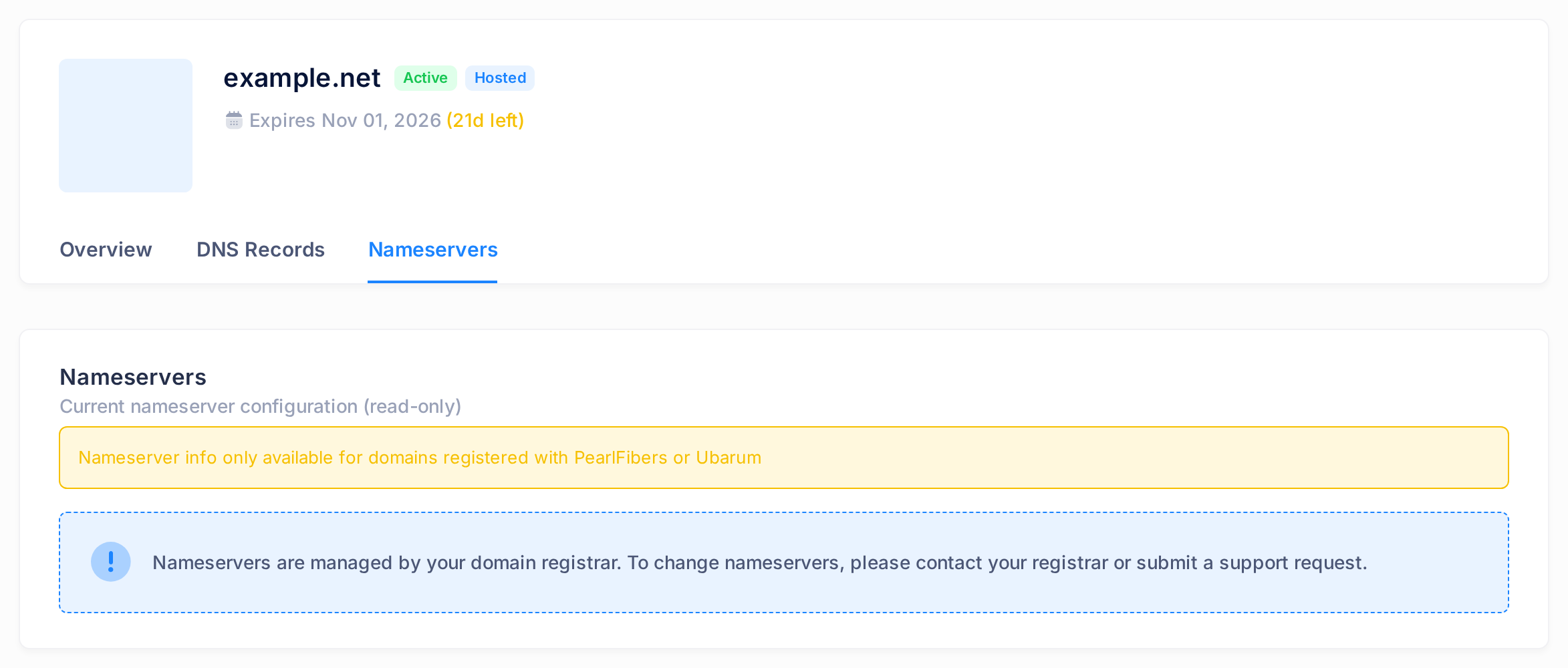
Under the box or the list, the card ends with a notice: Nameservers are managed by your domain registrar. To change nameservers, please contact your registrar or submit a support request. For a domain in your Loop account, start with support, as "Changing name servers" below explains.
The two NS rows on the DNS Records tab
The table on the DNS Records tab names name servers too: it includes two rows of the type NS. On example.com they are the first two rows.
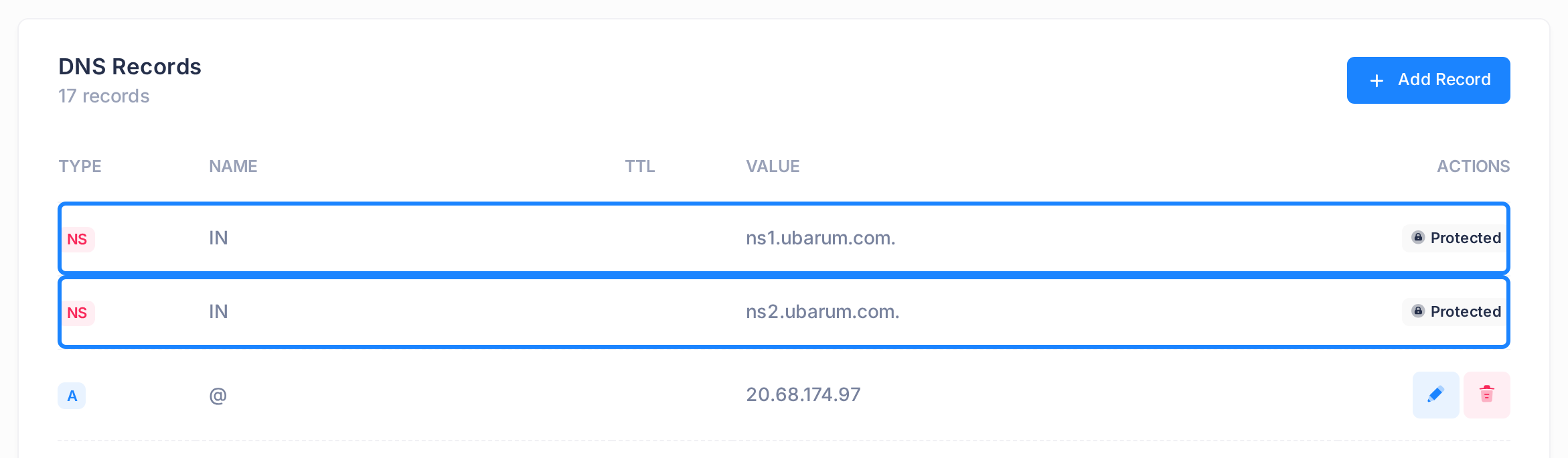
| Column | In the NS rows of example.com | How to read it |
|---|---|---|
| TYPE | NS | The row names one of the PearlFibers name servers that hold these records. |
| NAME | IN | The word IN stands here in place of a name. It does not mean that something is wrong with your domain. |
| VALUE | ns1.ubarum.com. and ns2.ubarum.com. | The name of the name server, written with a dot at the end. |
| ACTIONS | Protected | The row cannot be edited or deleted. It carries this badge where the other rows have their pencil and bin buttons. |
These two rows are written by PearlFibers, and they read the same on a domain that uses another company's name servers. So they do not show which name servers your domain uses: only the check above does.
Changing name servers
Name servers are changed where the domain is registered, and what your domain page shows, PearlFibers / Ubarum or no registrar at all, does not tell you who looks after the registration. So contact support with the domain name and the names of the name servers you want. Only if you registered the domain yourself with another company do you make the change at that company.
If you are moving such a domain to PearlFibers' name servers, the names to give that company are the two in the VALUE column of your NS rows, typed without the dot at the end.
Before you ask for a change
A change of name servers switches every record of the domain at once, email included, to the records held on the new name servers. It also does not reach every network at once: for a name ending in .com, some networks go on asking the old name servers for up to two days, and during that time the check above can still list the old names.
So first make sure every record your website and email need exists on the new name servers; for PearlFibers' name servers, that means on the DNS Records tab, and the guide How to Manage Your Domain's DNS Records shows how to read and add records. Leave the records on the old name servers in place until the change has settled. Never have name servers changed in order to change one record.
Common questions
The Nameservers tab lists names ending in pearlfibers.net, but the check shows ubarum.com. Which is right?
Both. PearlFibers' name servers answer under two pairs of names: ns1.ubarum.com and ns2.ubarum.com, and ns1.pearlfibers.net and ns2.pearlfibers.net. A domain entered with the pearlfibers.net names can show the ubarum.com names in the check. Its records in Loop are in effect all the same.
I saved a record on the DNS Records tab and nothing changed. Why?
Run the check above first: if your domain uses another company's name servers, a record saved in Loop does not take effect. If it uses PearlFibers', wait. Other networks keep an old answer for a set time (the record's TTL, counted in seconds), so a changed record can show its old value elsewhere until that time has passed. The guide Check That a DNS Change Is Live shows how to test a record.
My web designer asks for my name servers. What do I send?
Send the names from the check above: they are the ones your domain uses now. If the designer wants your domain moved to other name servers, read "Before you ask for a change" first.
If something looks wrong
- The answer of the check has no
nameserver =line and noNXDOMAINline; it may say that there is no answer. You asked about a name inside the domain, such as www.example.com. Type the domain alone, as it is written at the top of the domain page. - The card on the Nameservers tab says No nameservers configured. Loop received no name-server names from the registrar. This does not by itself mean that your domain has none: run the check above.
- The card says Failed to contact Enom API or Failed to get nameservers. The registrar could not be reached or gave no usable answer; Enom is the registrar service Loop asks. Open the page again later.
- The card says Network error loading nameservers. Your browser got no answer from Loop. Check your connection and open the page again.
- The card says Invalid domain format. The tab cannot list name servers for a domain whose ending has two parts, such as
.com.iq. Use the check above. - The card says Domain not found or access denied, or one of the messages above stays. Contact support and quote the message.
Need a hand? Click the Help tile on the home screen, then Live Chat or Submit a Ticket. Send us the domain name and the answer of the check, copied as it is.