
How can we help?

Your domain opens your website when two of its DNS records — the entries that say where each name leads — point to the website's server: one for the domain itself (example.com) and one for www (www.example.com). Find your case:
- Your website is hosted with PearlFibers: Steps 1 to 3. You only check.
- Another provider gave you an IP address for www (numbers such as
203.0.113.10): Steps 1 to 5, then Step 7. - Another provider gave you a host name for www (a name such as
target.example.net): Steps 1 to 4, then Steps 6 and 7.
Before you start
- For a website at another provider you need its values: an IP address for the domain itself and, for www, an IP address or a host name. Copy them exactly.
- Where this guide says "contact support": on the home screen, click Help, then Live Chat or Submit a Ticket.
Step 1 — Check which name servers your domain uses
Records saved in Loop reach your visitors only if the domain uses the PearlFibers name servers, the servers that answer DNS questions for it. Loop does not check this.
- Open a command window. On Windows, press the Windows key, type
cmdand press Enter. On a Mac, press Command and Space together, typeTerminaland press Return. - Type
nslookup -type=NS example.com, with your own domain in place of example.com, and press Enter. - Each line of the answer that contains
nameserver =ends with the name of one name server. Names ending inubarum.comorpearlfibers.netare PearlFibers name servers.
No computer? Open the web page Google Admin Toolbox — Dig, type your domain under Name and press NS.
Other names belong to another company: stop here and change the two records at that company, which keeps the records that count. If no name server is listed, or you are not sure, contact support.
Step 2 — Open your domain
- On the home screen, click the Portal tile.
- Click View All Services.
- Click the Domains tab.
- Click Manage on the card of your domain. On its page, the badges after the domain name must read Active and Hosted; if they do not, contact support.

Step 3 — Read the two website rows
- Click the DNS Records tab.
- Find the two rows with
Aunder TYPE and@orwwwunder NAME.@is the domain itself, example.com;wwwis www.example.com. - Write down the VALUE of both rows. The page keeps no history: typing the old value back in is the only way to undo a change.
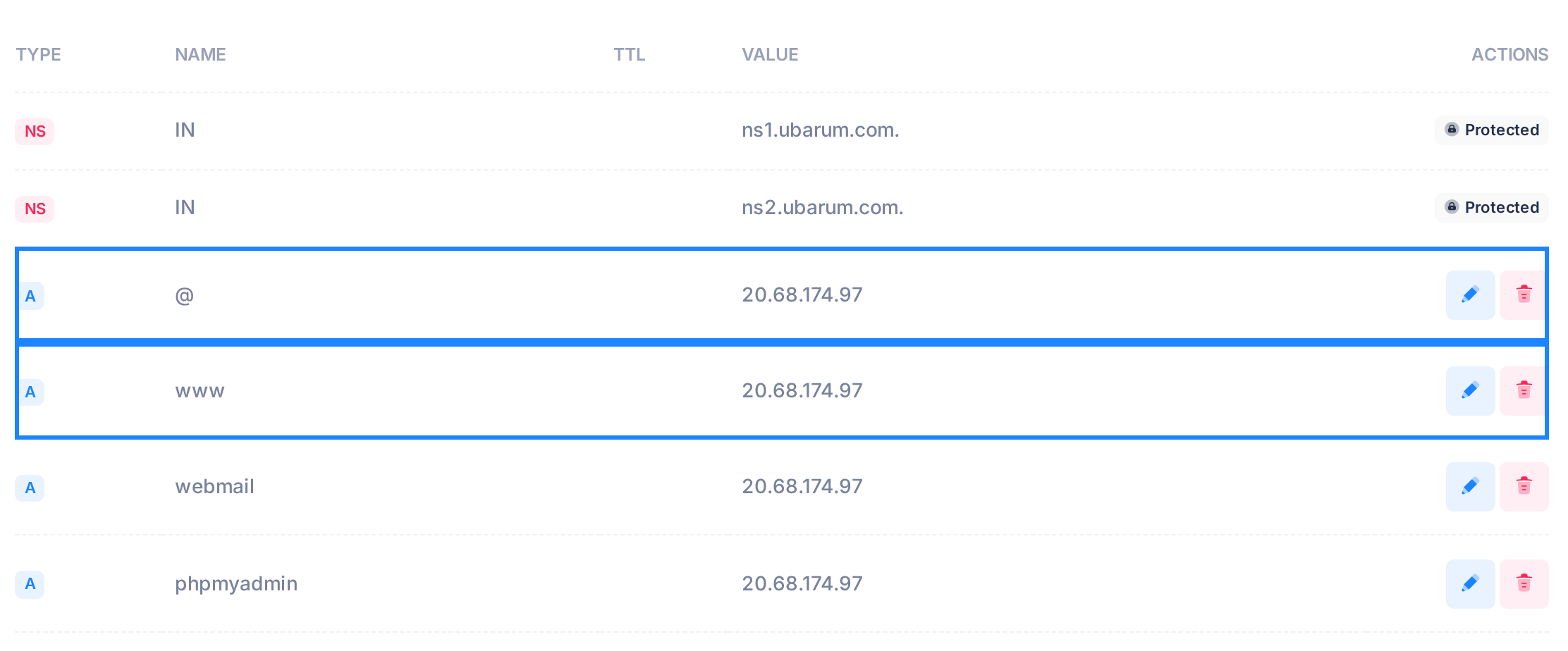
Website hosted with PearlFibers. A domain that Loop set up has 20.68.174.97, the address of the PearlFibers hosting server, in both rows. If yours do, both names already lead to your website: change nothing — you are finished. If a row is missing or holds a different address, contact support.
Step 4 — Point the domain itself to your provider
- In the row
A@, click the pencil icon at the end of the row. The name, the TTL and the value turn into boxes. - Leave the name and the TTL — the seconds other networks may keep an answer — as they are.
- In the box under VALUE, replace the address with the IP address from your provider, for example
203.0.113.10. - Click the tick in the row. The message DNS record updated successfully appears and the row shows the new address. Wait for this message before you click another pencil: with two rows open, what you typed in one can be saved into the other.
If your provider gave you several IP addresses for the domain itself, put the first into this row and add each further one with Add Record: Type A, Name @, the address under Value, then Save.
Step 5 — Point www with an IP address
- In the row
Awww, click the pencil icon. - Replace the address under VALUE with the provider's IP address for www. Leave the name and the TTL.
- Click the tick and wait for DNS record updated successfully. Then skip to Step 7.
Step 6 — Point www with a host name
A host name goes into a CNAME record, which makes www an alias of that name. A row's type cannot be changed, and a name with a CNAME record can have no other record, so the A row for www is deleted first and the CNAME added second.
Between the two, www.example.com does not exist: whoever opens it then gets an error, and their network may remember "not found" for up to a day. Keep the gap to seconds: have the host name ready to paste, choose a quiet time and do the steps without a pause.
- In the row
Awww, click the bin icon. A dialog opens. - Click Yes, delete it and wait for the message DNS record deleted successfully.
- Click Add Record. A form opens above the table.
- Under Type, choose
CNAME. - Under Name, type
wwwand nothing more. - Leave TTL at 3600, the number already in the box.
- Under Value, type the host name only — nothing in front of it, no slash after it — and end it with exactly one dot:
target.example.net.Without the dot, Loop reads the name as part of your own domain and still reports success. - Click Save once. The message DNS record added successfully appears. If an error appears instead, do not click Save again: a second click can store another copy of the row. Go to "If something goes wrong".
Step 7 — Check the result
- In a command window (Step 1), type
nslookup -type=A example.com ns1.ubarum.com, with your own domain, and press Enter. The name at the end asks the PearlFibers name server directly, which shows what is saved now. - Skip the first two lines,
Server:andAddress:— they describe the name server itself, not your record. Your record follows the empty line:Name: example.comand under itAddress:with the address you saved. - Repeat with
www.example.com. If www is now a CNAME, type-type=CNAMEin place of-type=A; the answer then readswww.example.com canonical name = target.example.net.
A line ending in NXDOMAIN means the name has no record at all: check the row's NAME. No answer means the name exists, but not with the type you asked for.
No computer? On the Google page from Step 1, type the name and press A or CNAME. It asks through Google's DNS service, which can still hold the old value for a while.
What happens next
A saved change is in service on the PearlFibers name server at once. Other networks keep an answer for as long as its TTL says, so some visitors still reach the old website for a while — up to 86400 seconds, one day, if the row's TTL cell was empty. If you replaced the www record, some may see "site not found" instead.
Good to know
- Change only the rows named here: most of the others are for your email (guide "Set Up Email on Your Domain").
- More ways to test a record: guide "Check That a DNS Change Is Live".
If something goes wrong
Failed to add DNS record when you save the CNAME
This message, in a dialog titled Error, means the name server refused the record. The row is stored all the same, and until it is repaired every other change reports a failure too:
- Click OK.
- Reload the page and click DNS Records. The refused CNAME row is the last row of the table.
- If the CNAME row is listed more than once, delete the extra copies with their bin icons, reloading the page after each. Failed to delete DNS record can appear although the row is removed.
- If an A row for www is still in the table, click its bin icon and confirm with Yes, delete it. The message DNS record deleted successfully appears and the CNAME serves www from that moment.
- If there is no A row for www, the refused row itself is wrong, for example a host name ending with two dots. Delete it, then add it again from item 3 of Step 6.
Other messages
- CNAME record cannot be created at the zone apex (@) — the Name box was left empty or holds
@. Typewwwunder Name and click Save again. For the domain itself a CNAME cannot be used: ask your provider for an IP address and use Step 4. - A record must be a valid IPv4 address (e.g., 192.168.1.1) — the value is not an IP address. For a host name, choose
CNAMEunder Type. - Two rows named
@and no www row. Click the pencil in the@row that holds the new address, change its name towwwand click the tick. If the other@row still holds the old address, do Step 4 again. - www does not open after you added the CNAME. Read its row: NAME must read
wwwand nothing more, and the host name under VALUE must end with a dot. If either is wrong, click the pencil, correct it and click the tick. - The website does not open at the new provider. Put the old values back: in a row you edited, click the pencil, type the old address and click the tick. If you replaced www with a CNAME, delete the CNAME row, then add a record with Type A, Name
wwwand the old address under Value.
Need a hand? Contact support with your domain name and the rows you changed.