
How can we help?

After you add or change a DNS record in Loop, three questions decide whether it works: is it saved correctly on the PearlFibers name server (a name server is the server that answers with a domain's records), does your domain use the PearlFibers name servers at all, and has the change reached your own network yet? The first two can be checked at once; the third can take up to one day.
Before you start
- You have saved the record on the DNS Records tab and the message Success appeared. To add, change or delete a record, see "How to Manage Your Domain's DNS Records".
- Steps 2 to 4 need a computer with Windows or macOS; Step 5 is for readers without one.
- To contact our support team: on the home screen, click Help, then Live Chat or Submit a Ticket.
Step 1 — Read the record as it is saved
- On the home screen, click the Portal tile.
- Click View All Services.
- Open the Domains tab.
- Click Manage on your domain.
- Open the DNS Records tab.
- Find your record in the table. A record you added is the last row.
- Compare the NAME and VALUE columns with what you meant to save, character by character.
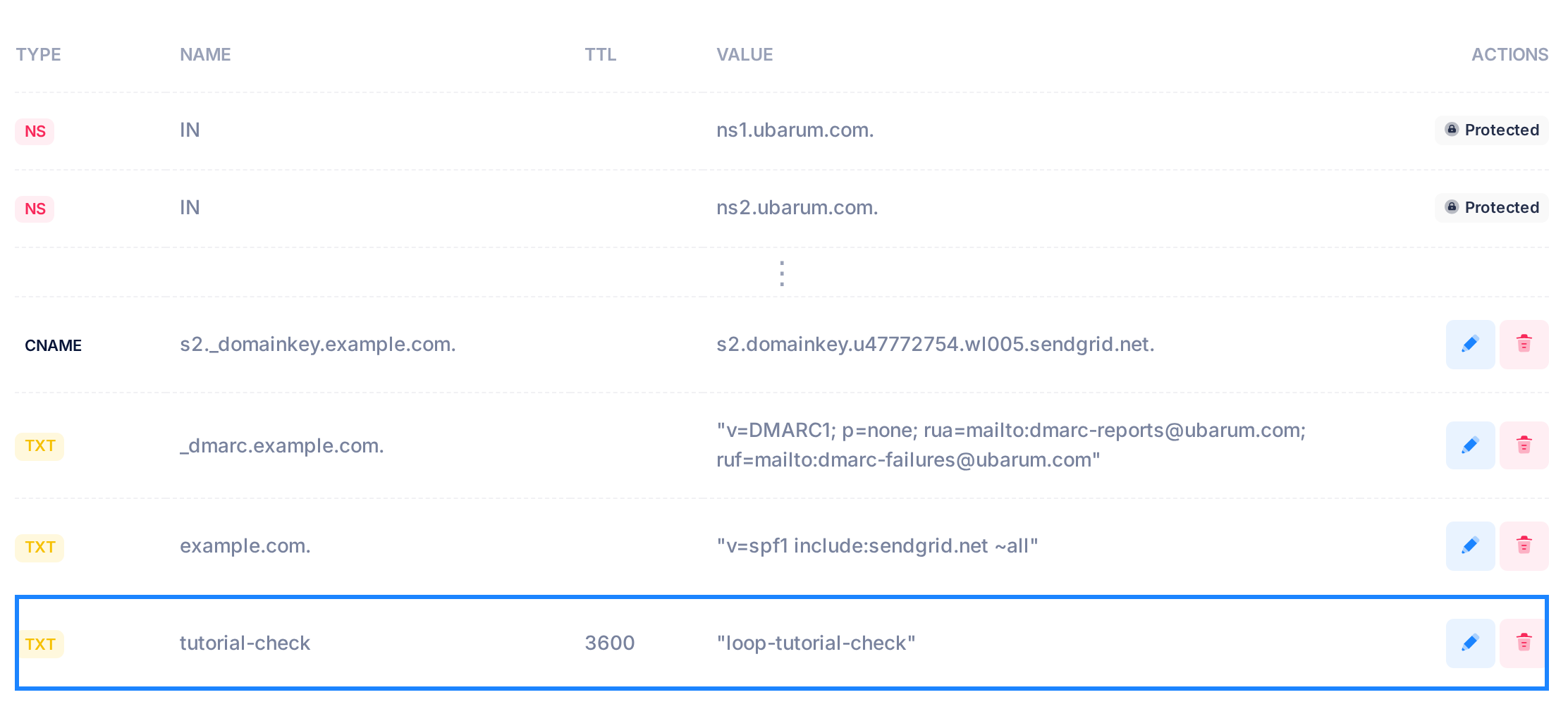
Loop adds no dot and no quotes to what you type. In NAME, @ and example.com. both mean the domain itself, and a short name such as tutorial-check means tutorial-check.example.com. In VALUE, a server name must end with a dot and a TXT value must be inside straight double quotes.
Step 2 — Is the record saved?
This command asks the PearlFibers name server ns1.ubarum.com itself, so it does not wait for any other network.
- On Windows, press the Windows key, type
cmdand press Enter: a window called Command Prompt opens. On a Mac, press Command and Space together, typeTerminaland press Return: the Terminal window opens. - Type
nslookup -type=TXT example.com ns1.ubarum.comwith two changes: the type of your record after-type=, and the full name of your record in place ofexample.com. Press Enter. - Skip the first two lines of the answer,
Server:andAddress:. They describe the name server and are printed even when no record is found. Your record comes after the empty line. - Compare it with the VALUE column. The answer may show a final dot or leave it out, and it always shows a TXT value inside quotes; everything else must match.
| Type | The record in the answer (sample domain) |
|---|---|
| A | Name: www.example.com and under it Address: 20.68.174.97 |
| CNAME | server.example.com canonical name = sendgrid.net. |
| MX | example.com mail exchanger = 10 mail.ubarum.com. |
| TXT | example.com text = "v=spf1 include:sendgrid.net ~all" |
AAAA, SRV and CAA records are checked the same way. The wording of the lines in this guide can differ a little on Windows and on a Mac.
A record that matches is saved on the PearlFibers name server; this check proves nothing more. If the answer also lists an old value you meant to replace, the old record is still in the table: delete it. No record after the empty line, or a different one: see "If something goes wrong".
Step 3 — Does your domain use the PearlFibers name servers?
The PearlFibers name server answers Step 2 for every domain that has a DNS Records tab. This lookup shows which name servers the internet uses for yours.
- Type
nslookup -type=NS, a space and your domain name alone, withoutwww, and press Enter. Put nothing after the domain: asked directly, the PearlFibers name server lists itself. - Read the lines that contain
nameserver =. Above them,Server:now names your own network's DNS service and the wordsNon-authoritative answerappear; both are normal.
- The names end in
ubarum.comorpearlfibers.net, with or without a final dot: these are PearlFibers' name servers, and your records in Loop are in use. - Other names: your domain uses another company's name servers, and records saved in Loop have no effect for visitors. Waiting will not help. The records that count are kept at that company: make the change there, or contact our support team if you are not sure.
- A last line ending in
NXDOMAIN: check the spelling. If it is right, your domain is not in the DNS at the moment: contact our support team.
Step 4 — Has it reached your network?
Do this step only if Step 3 listed PearlFibers' name servers.
- Type the command from Step 2 again, leaving out
ns1.ubarum.comat the end, and press Enter. - Compare the record in the answer with the one from Step 2.
- The same record: your network sees the change.
- The old value, or the old records without the new one: your network is still keeping its copy, for up to as many seconds as the TTL cell showed before your change. An empty cell counts as 86400, one day; if you do not remember the number, allow one day. Records with the same name and type, such as two TXT records on the domain itself, share one TTL: count with the largest.
- No record, and a last line ending in
NXDOMAINorNo answer: for a record you added, your network is keeping the answer "not found" from before the record existed, for up to one day whatever the new record's TTL.
Step 5 — No computer? Check from a web page
The page "Google Admin Toolbox — Dig" looks records up through Google's DNS service. It does what Steps 3 and 4 do; it cannot do Step 2. The page is in English.
- Open https://toolbox.googleapps.com/apps/dig/ in your browser.
- Type your domain name in the box Name and click NS. Read the name servers it lists as in Step 3.
- Type the full name of your record in the box instead and click the button for its type, for example TXT.
- Compare the answer with the VALUE column and read it as in Step 4.
Record not found!means Google's DNS service sees no such record.
What happens next
When Step 2 shows your record and Step 3 shows PearlFibers' name servers, your part is done: nothing needs to be saved again. Each network takes the change when its copy runs out. After the wait, repeat Step 4 or Step 5.
Planning a change? Lower the TTL first
One day before a planned change, edit the record and set its TTL to 300. When you edit a TXT record, the box under VALUE opens empty: paste the complete value, with its quotes, before you save. Do the same for every other record with the same name and type, saving one row before you open the next. After the change, other networks keep the old value for 300 seconds at most.
If something goes wrong
If Step 2 prints no record, read the last line of the answer.
| Last line | What it means | What to do |
|---|---|---|
ends in NXDOMAIN | Nothing is saved under this name. | Check the name in the command and the NAME column. A full name saved without a final dot, such as www.example.com, means www.example.com.example.com: use www, or add the dot. |
ends in No answer | The name has no record of this type. | Check the type after -type=. |
ends in REFUSED | The domain name in the command is misspelt. | Type it again. |
no servers could be reached | Your network does not let the direct question through. | Only Step 4 or Step 5 is possible there. |
- A name in the answer has your own domain added to its end (
target.example.net.example.com.): the final dot is missing in the value. - A TXT value comes in pieces, or stops at the first semicolon: its quotes are missing.
- Saving ended with Failed to add DNS record. Do not click Save again: each click stores another copy of the refused record, and until it is deleted the name server answers with the records as they were. Reload the page, open DNS Records and delete the refused row, the last row of the table, with any copies, reloading after each. If it is a CNAME you want on a name that has another record, delete that other row instead.
- Saving ended with Failed to update DNS record. Do not delete the row you were editing: for a mail record that would lose email. Check what you typed, correct it and click the tick again. If it fails again, reload the page, look at the last rows of the table for a row added earlier that was refused, delete that row, then check the row you edited.
- All three checks are right, but the website, email or verification still fails. Your record is saved, in use and visible: compare its name and value with what the service gave you, and ask that service to check again.
After any correction, repeat Step 2. Need a hand? Click Help, then Live Chat or Submit a Ticket, and send us the domain name, the record and the answer from Step 2.