
How can we help?

Your email plan holds the mailboxes on your domain — addresses such as sara@example.com, each with its own password. Loop shows it on My Email, which lists every plan you have, and on a page for each plan. On these pages an "account" or "email account" is a mailbox. Where this guide says "send us a ticket": on the home screen, click the Help tile, then Submit a Ticket. The Help menu and the Help Center button on the email pages lead to a different page: do not use them.
Where to find it
- On the home screen, click the Portal tile.
- In the blue box My Services, click View All Services. The page My Services opens.
- Click the Email Plans tab. It shows one card for each plan.
- Click Manage on a plan's card. That plan's page opens.
- Click Back at the top of the plan's page. My Email opens.
To leave, click Dashboard at the top of the page; on a phone, tap the first button at the top, then My Portal. Both open the Portal, whose logo leads back to the home screen. Do not click Home under the page title: it opens an error page.
The My Email page
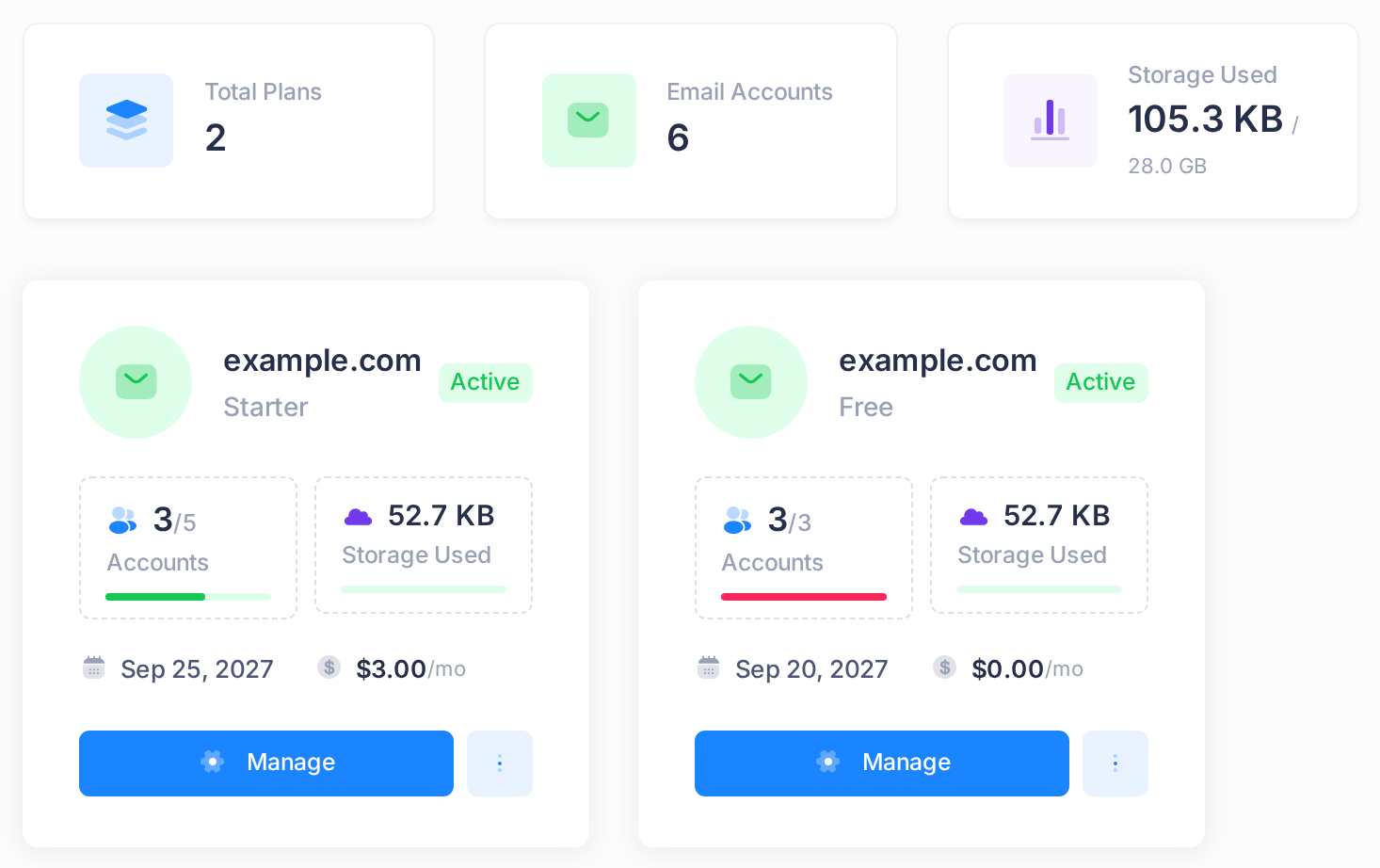
The first three boxes add up all your plans: Total Plans, Email Accounts (the mailboxes of all plans together) and Storage Used (the space your mail takes, then the storage of all plans together). Under them is one card per plan.
| On the card | In the picture | What it means |
|---|---|---|
| Domain, plan name, status badge | example.com, Starter, Active | The domain opens the plan's page; so does Manage, which reads View on a plan that is not active. |
| Accounts | 3/5 | The mailboxes on the domain, of the number the plan allows. Storage Used is the space they take. |
| A date and a price | Sep 25, 2027, $3.00 /mo | Explained under What you pay and when it renews. |
These pages also carry request buttons: Request New Plan and each card's three-dot menu here; Service Request, New Request and, on a full plan, Request More Accounts on a plan's page. None of them tells our team anything: send us a ticket instead.
Two plans on one domain
A hosting order brings free mailboxes with it: an email plan named Free on the same domain, with as many mailboxes as the hosting plan includes. If you also buy an email plan for that domain, you see two cards for it.
Both plans list the same mailboxes — every mailbox of the domain — and each counts all of them against its own limit. So the picture shows 3/5 on Starter, 3/3 on Free and 6 in the Email Accounts box, although only three mailboxes exist, and their space is counted twice too. The two limits are not added together. To add a mailbox, open the plan that still has places: Starter here.
One plan's page
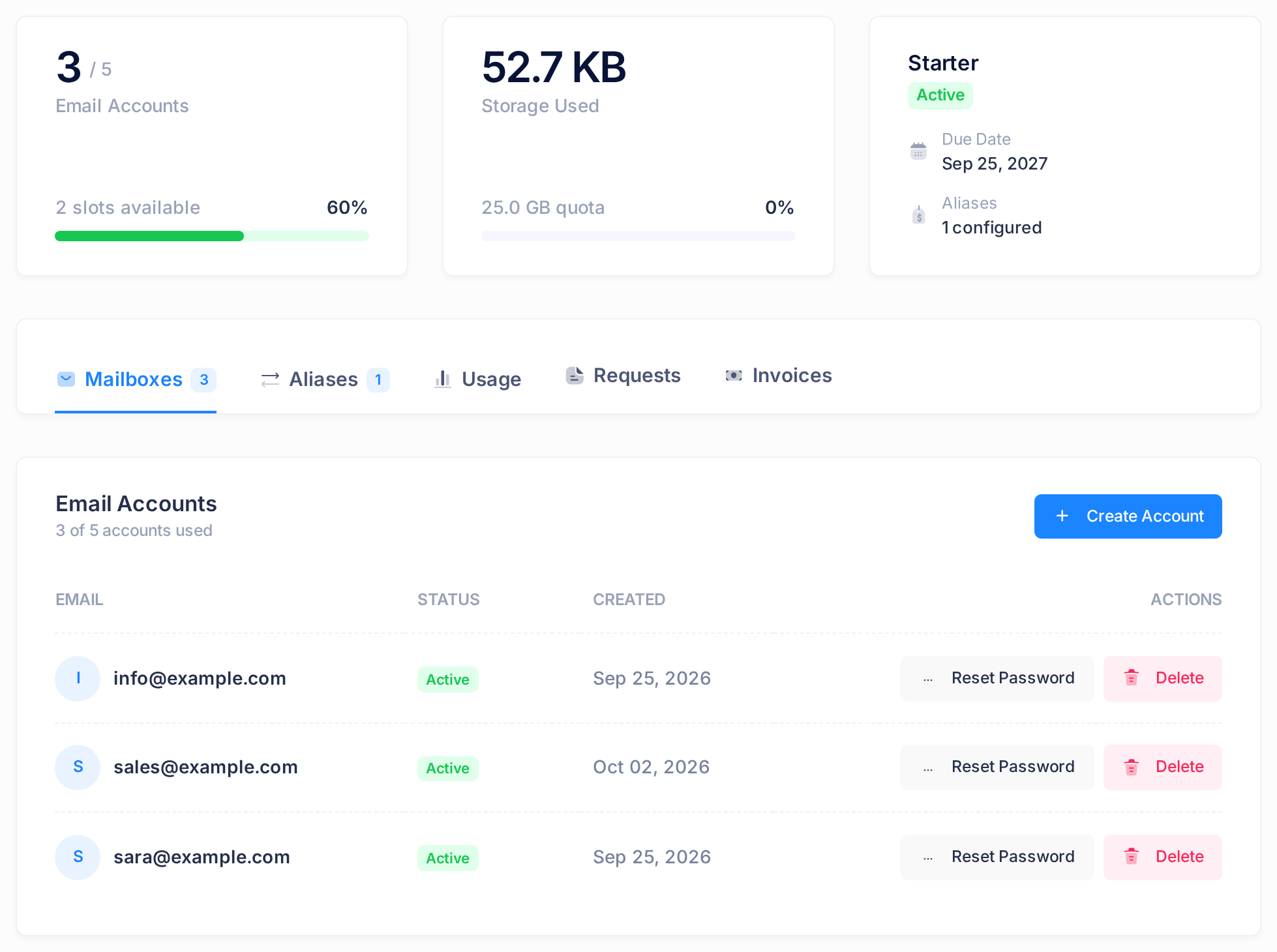
The title is the domain. At the top are Back and, while the plan has a free place, Create Account. Three boxes follow, then the tabs.
| Box | In the picture | What it means |
|---|---|---|
| Email Accounts | 3 / 5, 2 slots available, 60% | The same count as on the card, the places left and the share used. |
| Storage Used | 25.0 GB quota | The space all the mailboxes use, then a total: one mailbox's storage on this plan (5 GB on Starter) times the number of mailboxes the plan allows. The total is not an enforced limit: the mail server does not hold mailboxes to it. |
| Plan name and status | Starter, Active, Due Date Sep 25, 2027, Aliases 1 configured | The date from the card and the number of aliases. |
The five tabs
The page opens on the first of five tabs. On a phone the row of tabs and the mailbox list are wider than the screen: slide each sideways to reach the rest.
- Mailboxes — every mailbox of the domain, A–Z. The columns are EMAIL, STATUS (Active on a new mailbox), CREATED and ACTIONS, with two buttons on each row: Reset Password — see "Reset a Mailbox Password" — and Delete — read "Delete a Mailbox" first. Create Account above the list adds a mailbox: see "Create a Mailbox".
- Aliases — an alias is an extra address with no mailbox of its own: its mail is delivered to another address, for example
contact@example.comtoinfo@example.com. Add Alias does not work, so you cannot add an alias yourself, or put back one you delete. - Usage — the space each mailbox uses, measured when you open the tab, the largest first.
- Requests — what the request buttons have stored, for all your plans. Empty, it reads No requests yet.
- Invoices — the invoices of this plan's subscription, as text only.
What you pay and when it renews
The price on a card is the list price of one mailbox for one month, not what you pay. Due Date is set when the plan is ordered (order day plus the plan's length) and renewing does not move it: once that day has passed, a red badge ending in d overdue stays beside it, even on a renewed, paid plan. It is not a payment deadline. The real figures are on the plan's subscription:
- On an email page, open the menu under the round picture or letter at the top of the page.
- Click Subscriptions. The page My Subscriptions opens. The Billing tile on the home screen opens the same page.
- Find the card with Email plan under its name.
- Read PRICE, the amount for one whole billing period, and RENEWS ON, the day the paid period ends.
A plan with no card on My Subscriptions has no subscription of its own: send us a ticket to have its dates confirmed.
Common questions
Where are the settings for Outlook or my phone?
Not on these pages. Follow "Set Up Your Email in Outlook" or "Set Up Your Email on iPhone and Android".
The plan is new. Will mail arrive?
Only once the domain's DNS records — the entries that tell other networks where its mail goes — point to our mail server. "Set Up Email on Your Domain" shows how to check.
How do I get more mailboxes than my plan allows, an alias or another plan, or cancel a plan?
Not from these pages. Send us a ticket that names the domain and what you need.
If something looks wrong
- The Email Plans tab reads No email plans. Your account has no email plan. If you have bought one, send us a ticket.
- A red badge says a paid plan is overdue. See What you pay and when it renews.
- A red badge reads Account limit reached and Create Account is gone. Every place on this plan is taken. If the domain has a second plan with places left, add the mailbox there. If not, send us a ticket to ask for more, or free a place as "Delete a Mailbox" describes.
- A yellow notice begins This plan is, and Create Account, Reset Password and Delete are gone. The plan is not active: you can only read its lists and the last three tabs. Send us a ticket to ask what is needed.
Need a hand? On the home screen, click Help, then Submit a Ticket, and tell us the domain and what the page shows.