
How can we help?

Every file and folder of your website has a permission: a number that says who may read it, change it and run it. Use this guide when your site answers "403 Forbidden" for a page or a picture, or when an installer asks for a "writable" folder. Where this guide says "send a ticket": click the Loop logo at the top of the page to return to the home screen, click Help, then Submit a Ticket.
Before you start
- A change acts on your live website at once.
- For a "writable" folder, read the section about it near the end first.
- On a phone, turn it sideways: upright, the list is wider than the screen, and a row's name is out of sight when you reach its number and three-dot button.
Step 1 — Open the file manager
- On the home screen, click the tile Portal.
- On the page that opens, click View All Services.
- On the page My Services, click the tab Hosting.
- Click Manage on the card of your website, in our example
example.com. - In the card Quick Links, click File Manager.
- Scroll past the first card, Git Repository, to the list of files.
Step 2 — Read the number
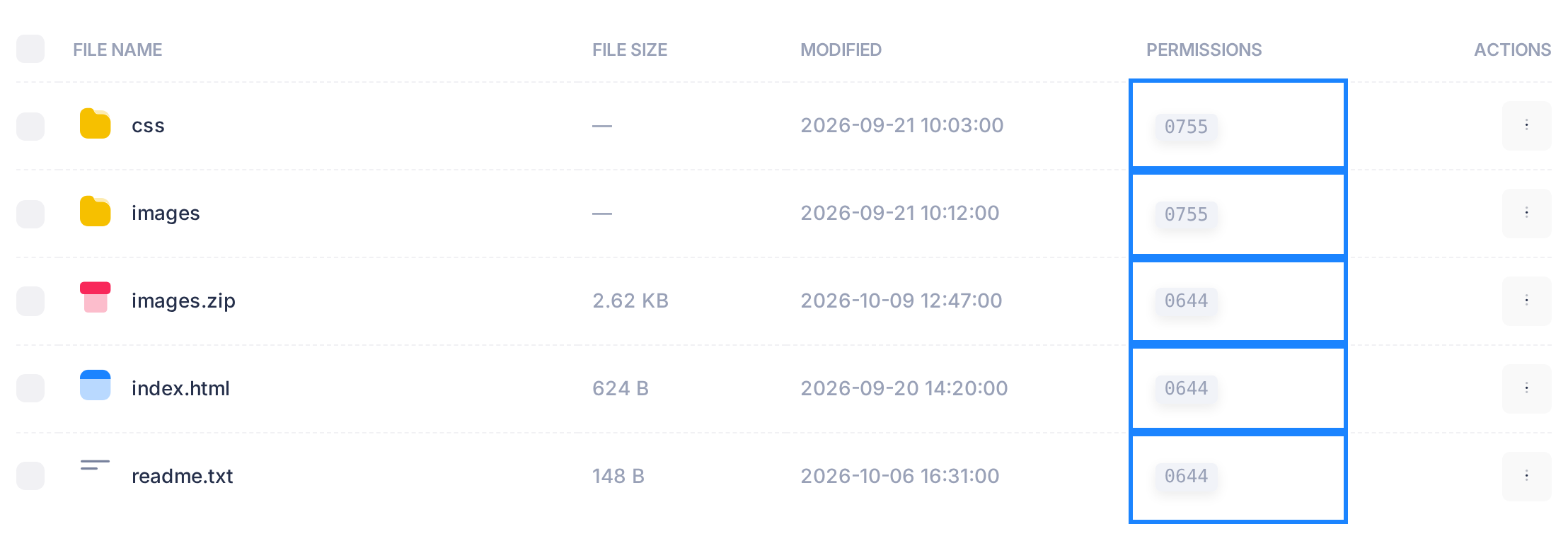
The column PERMISSIONS shows four digits, such as 0644. Ignore the 0 in front. The other three stand, in order, for the item's owner, for the owner's group and for everyone else. Each says what they may do:
| Digit | Allows |
|---|---|
| 7 | read, change and run |
| 6 | read and change |
| 5 | read and run |
| 4 | read only |
| 0 | nothing |
For a folder, "run" means "enter it". Two values are enough for a website: 644 for a file, so that everyone may read it, and 755 for a folder, so that everyone may enter it. The list does not show who owns an item, so you cannot tell which digit counts for your visitors. Test all three:
- The refused address names the folders the file is in:
example.com/images/storefront.pngis the filestorefront.pngin the folderimages. An address that ends with the domain or a folder means the first page there,index.htmlorindex.php. - Check each folder on the way, starting in the folder the list opens on. A folder passes if each digit is 5 or 7: 755 passes; 700, 750 and 644 do not. To go into a folder, click the three-dot button at the end of its row, under ACTIONS, and choose Open: its name appears beside the house icon above the list.
- Check the file's row, without opening the file. A file passes if each digit is 4 or more: 644 passes; 600 and 640 do not. A file named
.htaccessin any folder you went through must pass too. A file that fails can open as an empty editor: click Close then, never Save, which would empty the real file. - Note the name and number of the first item that fails. If nothing fails, change nothing and send a ticket.
Other numbers, such as 775 for folders and 674 for files, pass the test: leave them as they are.
Step 3 — Change the number of one item
One control in the next window can take part of your site offline: the tick box Apply recursively to all files and subdirectories. On a folder it gives the same number to the folder and to every file and folder inside it, and the old numbers are kept nowhere. With 644 none of those folders can be entered and visitors lose that part of the site; with 755 your site's own programs can lose the right to save into them. The box opens empty: leave it so.
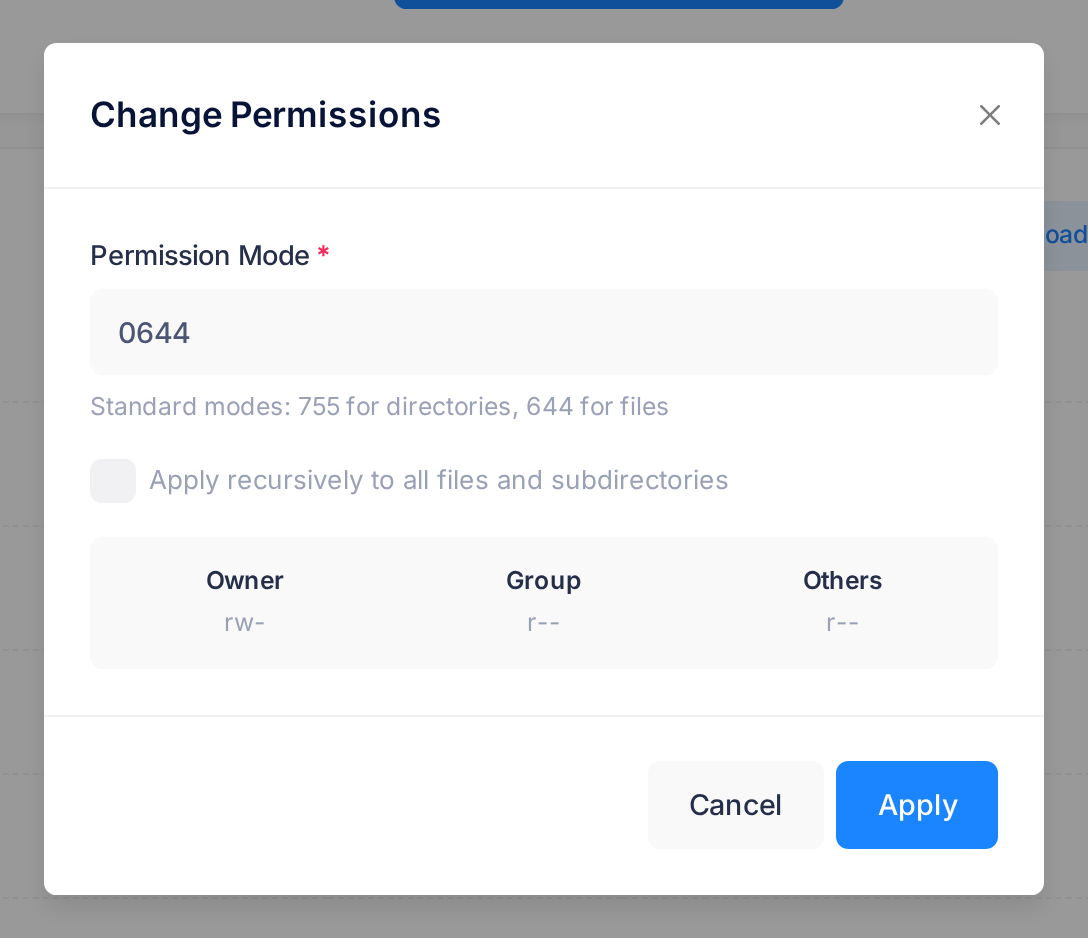
- Click the three-dot button of the item and choose Permissions. The window Change Permissions opens.
- The field Permission Mode holds the present number, such as 0644. The window does not name the item: if this is not the number you noted in Step 2, click Cancel and start again from the right row. Typing this number back is the only undo.
- Delete everything in the field (it is full and takes no new digit until you do), then type three digits:
644for a file,755for a folder. - Once the third digit is in, Owner, Group and Others, under the tick box, must read
rw-,r--,r--for 644, orrwx,r-x,r-xfor 755. If they read anything else, correct the field. - Click Apply. The window closes, a message reads Permissions updated, and the row shows the new number with a 0 in front.
What happens next
Reload the page or picture that was refused. If it is still refused, go back to the test of Step 2.
Saving a file in the file manager's editor sets that file to 644, whatever it was.
Numbers not to use
The window does not warn about a dangerous number. Avoid these two:
000lets nobody read the item: neither your visitors nor the file manager.777lets every other program on the server change the item, and with the tick box everything inside a folder at once.
Leave an item that already shows 777 as it is: your site may depend on saving there.
When a program asks for a writable folder
A "writable" folder is one your website's own programs can save files in. Whether they can depends on the number and on who owns the folder; the file manager cannot change the owner. A folder made with New Folder gets 755 and does not belong to those programs: only a number that lets everybody write, such as 777, would let them save into it. Do not set it: send a ticket with the folder's name and what the installer asks for.
If something goes wrong
- Invalid permission mode. Nothing was changed: the field must hold three digits, each from 0 to 7.
- A folder opens as a blank card with Unable to read directory contents or Internal Server Error. Click the house icon above the list, go to the folder that holds it and look at its row: if its number fails the test of Step 2, set it to 755; if it passes, send a ticket.
- You ticked the box with 644 on a folder. Set that folder to 755 without the tick: enough when it holds only files. If it holds folders too, tick the box with 755 this once: every folder can be entered again, and the files, now 755 as well, can still be read. If uploads or saving on your site then fail, send a ticket.
In a ticket, give the domain, the file or folder and the folders it is in, the number it shows and the exact words of any message. Open and Follow a Support Ticket shows how to send and follow one; Describe a Problem So We Can Fix It Fast lists what else helps.