
How can we help?

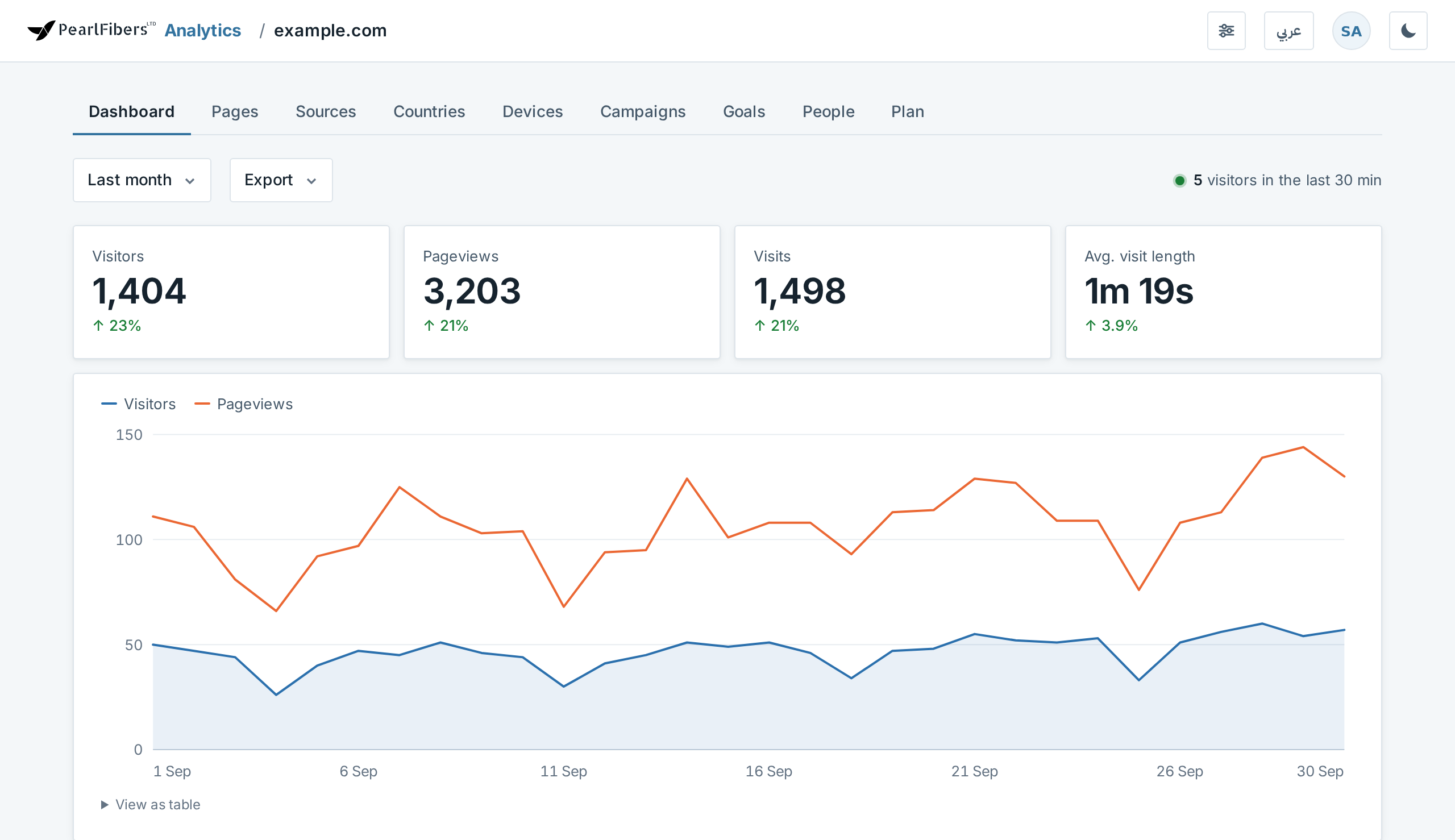
The dashboard of PearlFibers Analytics shows how many visits your website gets, which pages are opened and where the visitors come from. This guide says, from the top of the page to the bottom, what each number counts and what it does not. The examples are from a made-up shop's website, example.com, for the period Last month, September 2026.
PearlFibers switches Analytics on for your website; you cannot do it yourself. If your home screen in Loop has no tile PearlFibers Analytics, click the Help tile, then Submit a Ticket, and ask us for it.
Where to find it
- On Loop's home screen, click the tile PearlFibers Analytics. It opens a separate site, analytics.pearlfibers.com, in the same browser tab; you are already signed in.
- With one website, its dashboard opens at once. With several, the page Your sites opens: click the card of the website you want.
- Look under the row of tabs, which starts with Dashboard. If you see a card headed Let's connect with your website's name and a line of code instead of numbers, the website has not counted a visit yet: follow the guide Install the Tracking Code on Your Website.
To go back to Loop, click the round button with your initials in the top bar, then Your PearlFibers portal.
The period button
Under the tabs, the first button names the period that the cards, the chart and the lists count: Last 30 days when the page first opens. It opens a menu of nine choices, with a tick beside the one shown. Next to it, Export opens a menu of nine files to download, each marked (CSV): tables for a spreadsheet program.
| Choice | What it covers |
|---|---|
| Today, Yesterday | That day alone |
| Last 7 days | Today and the six days before it |
| Last 30 days | Today and the 29 days before it |
| This month | From the 1st of the month to today |
| Last month | The whole previous calendar month |
| Last 6 months, Last 12 months | From the 1st of the month six or twelve months back to today |
| All time | The last five years |
For any other period, set the two date boxes at the bottom of the menu to the first day and the last day, and click Apply custom range. The button then reads the two dates, for example 20 Sep 2026 – 26 Sep 2026.
A period cannot reach further back than the history of your plan: six months on the plan Basic. A period that reaches further back is cut, and above the button you read Showing the last 6 months — that's the history included in this site's plan. On Basic that normally happens for Last 6 months, Last 12 months and All time, so all three show the same numbers.
The period stays as you move between the first six tabs, Dashboard to Campaigns; after Goals, People or Plan the tabs go back to Last 30 days.
The live line and the four cards
At the end of the row with the period button (on a phone, under it) stands a number followed by visitors in the last 30 min, the only live number on the page: it counts the different visitors of the last 30 minutes and renews itself every 30 seconds. The cards, the chart and the lists are brought up to date every five minutes and change only when you reload the page, so they can be about five minutes behind.
| Card | Example | What it counts |
|---|---|---|
| Visitors | 1,404 | The visitors of each day, added up (for Today and Yesterday, of each hour: see the end of this guide). One visitor is one browser on one internet connection, not a person: someone who comes by phone and by computer counts twice. Nobody can be followed from one day to the next, so someone who comes on three days counts three times: 1,404 never means 1,404 different people in the month. |
| Pageviews | 3,203 | Pages opened. The same page opened twice counts twice. |
| Visits | 1,498 | One visitor's run of pages and clicks with no pause longer than 30 minutes. After a longer pause the next page starts a new visit, so one visitor can make several visits in a day. |
| Avg. visit length | 1m 19s | The time from the first to the last page or click of a visit, averaged over all visits. A visit with one page has the length 0, however long the person read it, so a website where most people read one page shows a short average. |
Under each number stands the change against the period of the same length right before it: a green ↑ or a red ↓ with a percentage, or only — when there is nothing to compare with. It is not always growth or loss: Today is compared with the whole of yesterday, so early in the day the arrow points down, and a percentage is large when your website only started counting during the earlier period.
The chart
The chart draws two lines, Visitors and Pageviews. There is one point per day; for Today and Yesterday, one per hour. Move the pointer over the chart and a small box shows the date and both numbers: in the example Sun 27 Sep 2026, 56 visitors, 113 pageviews. Under the chart, View as table lists the same numbers, one row per point.
The six lists
Each of the six lists under the chart shows at most its 8 biggest rows, with a bar and a number; the small grey word at the top of a list says what the number counts. Report → opens the full list, for the same period, on its tab in the row of tabs (Top pages on Pages). A list with nothing to show reads Nothing here for this period yet.
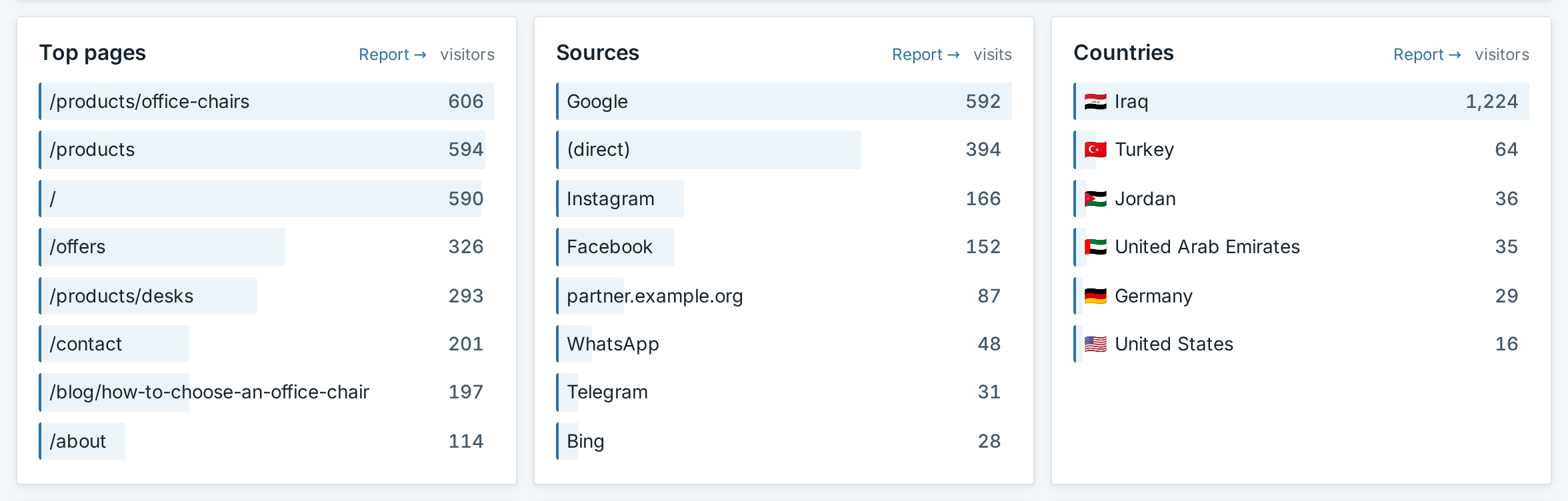
- Top pages, counted in visitors. A row is a page address without anything after a "?". A visitor who opens three pages stands in three rows, so do not add the rows up.
- Sources, counted in visits. A visit that arrives from another website is listed under that website: a known one by its name (Google or Instagram, for example), any other by its address, such as partner.example.org. A visit that comes from no website, through a link carrying
?utm_source=and a name, is listed under that name. (direct) is every visit with neither: Analytics knows nothing about where it came from. - Countries and Devices, counted in visitors. Devices names the kind, such as Mobile, Desktop or Tablet. When Mobile stands twice, add the two rows: both are phones.
- Campaigns, counted in visits. It stays empty until visits arrive through tagged links: add
?utm_campaign=and a name to the links you share, for exampleexample.com/offers?utm_campaign=new-chairs. The example's row new-chairs counts 125 visits through such links. - Goals, counted in conversions: how often a chosen moment of a visit happened. Without any setup these are Outbound link clicks, clicks on links to another website, and File downloads, clicks on links to files such as a PDF. A goal of your own is set up on the tab that Manage → opens; the example's goal, Contact page opened, counts once per visit in which the page
/contactis opened.
On a phone
The lists stand one under the other, the cards two by two, and the chart shows only every second date. The numbers beside the chart can lose their first digit, so that 100 looks like 00: open View as table for the figures.
Common questions
Is every visit to my website in these numbers?
No. A visit is counted only when the page is on the domain registered for your website in Analytics, with or without "www."; the same pages under any other address are not counted. Visitors whose browser asks not to be tracked, and robots, are left out. Your own visits are counted like anybody's.
Can I read the dashboard in Arabic?
Yes. Click عربي in the top bar: the page turns Arabic and the button then reads English. The choice is remembered in that browser and is separate from the language you use in Loop.
If something looks wrong
- Visitors for Today or Yesterday is higher than the same day shows in a longer period. For these two periods the card adds up the visitors of each hour, so a person who is on the website in three different hours counts three times: 64 in the example, for a day that reads 59 under Last 30 days. The lower number is the day's.
- On the tab Sources, the column Pageviews of the first table reads 0 in every row. Ignore that column: sources are counted in visits.
- The numbers stopped although people visit your website. Open a page of your website in another browser tab and watch the live line for a minute. A number above 0 means visits are being counted. If it still reads 0, your visit was not counted: your own browser may ask not to be tracked, or the page may no longer carry the line of code, for example after the website was rebuilt. Analytics shows that code only until a website has counted its first visit, so ask us for it.
Need a hand? Go back to Loop's home screen, click the Help tile, then Submit a Ticket, and tell us the website, the period you chose and the number that looks wrong.